 4vetsbyvets
Getting started
How to set up and use Glance
Four short steps. You need Google Chrome on a computer and your usual VA.gov sign-in.
-
Add Glance to Chrome
Open Glance on the Chrome Web Store (opens in a new tab) and click Add to Chrome. When Chrome asks, click Add extension.

Glance on the Chrome Web Store. Click Add to Chrome at the top right. -
Pin it to your toolbar
Click the puzzle-piece Extensions button at the top right of Chrome and find Glance. Chrome may pin it for you. If the pin next to Glance isn’t blue, click it. Once pinned, the Glance button stays in your toolbar. A number on it shows how many things need you.
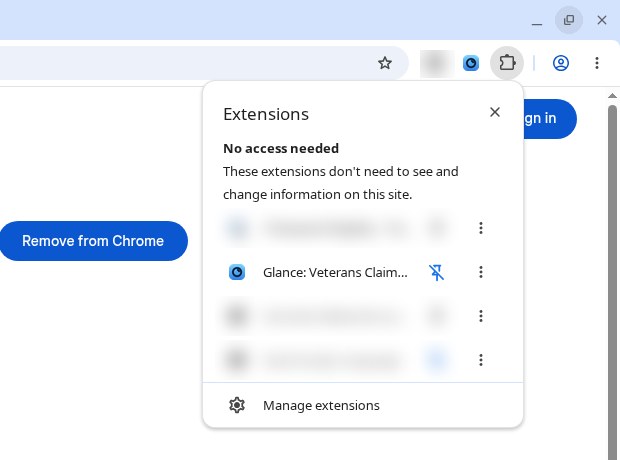
Glance in the Extensions menu. The blue pin means it’s pinned to your toolbar. -
Agree, then sign in to VA.gov
Click the Glance button. The first time, it shows what it will read and asks you to press I agree. Nothing is read from VA.gov before you do.
Then sign in to VA.gov (opens in a new tab) in the same Chrome, the way you normally do. Glance uses that sign-in. It never asks for or sees your password.
Want to look around first? Choose See example data. It shows a made-up veteran and reads nothing from VA.gov.
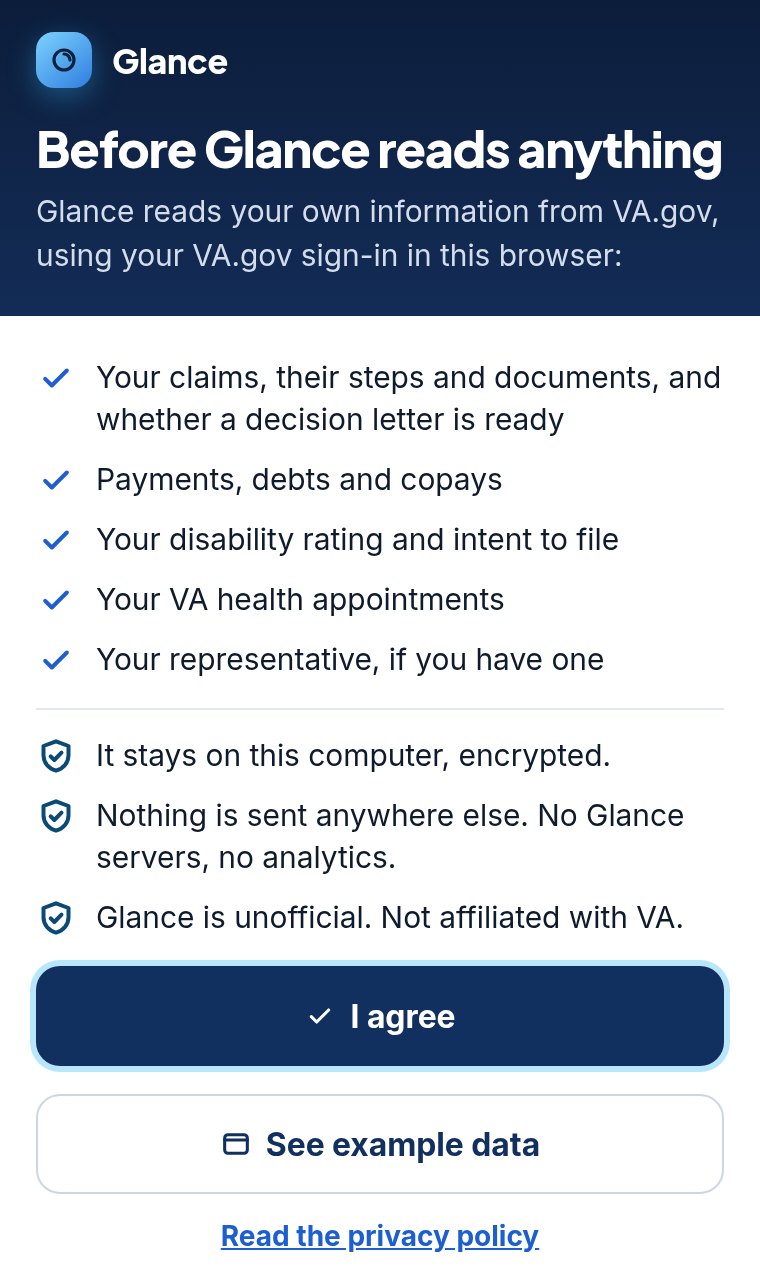
The one-time “I agree” screen -
Check now and read your status
Click the Glance button and press I’m signed in, check now. The popup shows the most important thing first. Press Open tracker to see everything: your claims, payments, rating, and appointments.
Every item has a link to the right VA.gov page, where you take action. After the first check, Glance checks again every hour while Chrome is open. You can change how often in More → Settings.
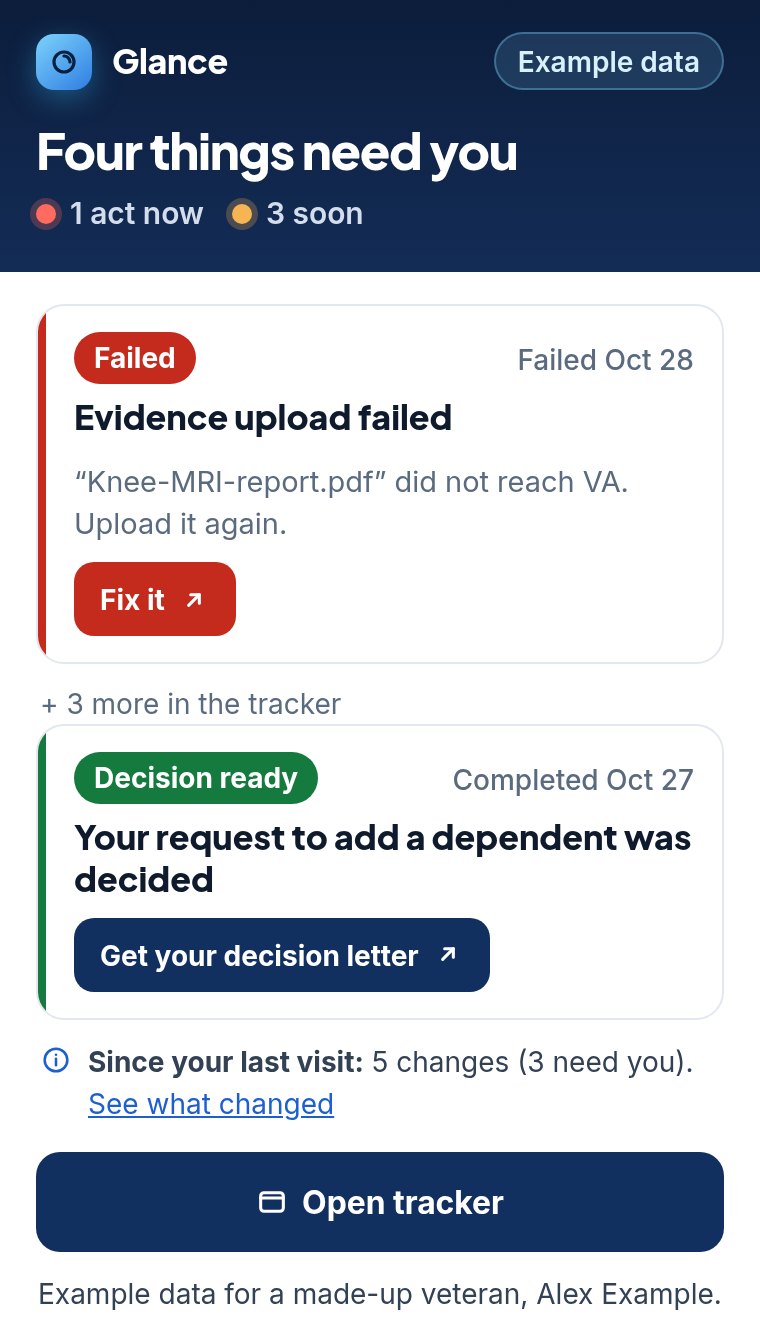
The popup, with example data for a made-up veteran


What the statuses mean
Glance shows each claim in VA’s 8 steps: Claim received, Initial review, Evidence gathering, Evidence review, Rating, Preparing decision letter, Final review, and Claim decided. Each step is marked Done, Current, or Not yet.

- Failed
- An upload did not reach VA. Upload it again on VA.gov.
- Overdue
- The due date has passed, for example on a VA request or a copay.
- Urgent
- Very little time is left, for example to dispute a VA debt or before an intent to file runs out.
- Due soon
- A deadline is coming up.
- To do
- Something to handle that has no close deadline.
- Decision ready
- VA decided a claim in the last 30 days. Your decision letter is on VA.gov.
- Signed out
- VA.gov signed you out. Glance shows what it saved last time. Sign in on VA.gov, then press Check now.
- “VA isn’t providing this right now”
- VA.gov didn’t send that piece, so Glance leaves it blank instead of guessing.
Glance is unofficial and can be wrong or out of date. VA.gov is the official source.
Common questions
Is my data private? Where is it stored?
Your information stays on your computer, in Chrome’s storage for the extension, and it is encrypted. There is no Glance server and no account. There are no ads, analytics, or tracking. The only website Glance talks to is VA.gov. No one else gets your information, including us.
Glance only reads. It never submits, uploads, changes, or deletes anything on VA.gov. To erase everything, go to More → Settings → Delete all, or remove the extension. If you share a computer, use your own Chrome profile. Details are in the Glance privacy policy.
Does it work on my phone?
No. Glance is a Chrome extension, and those only run in Chrome on a desktop or laptop computer. Chrome on a phone or tablet can’t add extensions. On your phone, check your claim on VA.gov.
What if Glance shows nothing?
- “Before Glance reads anything”: press I agree first.
- “Sign in to VA.gov”: sign in on VA.gov in this same Chrome, then press Check now.
- Still empty after you sign in: leave a VA.gov tab open and press Check now again.
- “VA.gov did not answer”: VA.gov may be busy. Try again in a few minutes.
- “Nothing needs you right now” or “No open claims on VA.gov”: Glance checked and found nothing waiting on you.
- You see “Example data”: that’s the made-up veteran. Turn it off in More → Settings.
Still stuck? Email glance@4vetsbyvets.com.
Does it cost anything?
No. Glance is free, with every feature, and there is no paid version. If you want to chip in, there’s an optional Buy Me a Coffee link. It doesn’t unlock anything.
Is Glance from VA?
No. Glance is an unofficial tool made by a veteran. It is not affiliated with or endorsed by the U.S. Department of Veterans Affairs. It doesn’t give legal advice or help prepare claims. For help with a claim, contact an accredited VSO, attorney, or claims agent.